Ban/pick and Fearless
Open the ban/pick board, run the turns, and lock the champions picked in earlier sets with Fearless.
このページの目次
- Before you start
- Start a draft
- 1. Press Start draft on the match page
- 2. Choose the two captains
- 3. Set Fearless and the timer
- 4. Open the board with Start draft
- How the turns run
- Play one turn
- 5. Open the board
- 6. Wait for your team's turn
- 7. Choose a champion
- 8. Press the confirm button
- Carry on with Fearless
- 9. Finish the earlier set
- 10. Start the next set
- 11. Check the locked champions
- Where results and series are recorded
- Practice without a match
- 12. Open the Draft practice panel
- 13. Choose an opponent and a timer
- 14. Press Start a practice
- Watching and sharing the board
- What is saved
- Where to go next
- Check it worked
Before you start
The ban/pick board is a web screen where the two captains of a match take turns banning and picking champions. On screen it is the Champion Draft panel. This page calls the tool ban/pick, and one run of it a draft, after the button names. Only the champion lineup is decided; teams and lanes stay as set in the match. The champion list and artwork are loaded from the champion data Riot publishes.
- The bot must have in-house matches turned on. How to open a match is in Run a match, step by step.
- Whoever starts a draft is the matchmaker who created that match, or a server admin (Who can press what · Appointing and revoking matchmakers).
- A draft can be started and played only while the match is at Recruiting, Roster pending or Lineup locked. Once it reaches In progress or ends, it cannot.
- The two captains are members on the match roster. A captain does not need to be a matchmaker.
- There are no Discord slash commands for this. The ban/pick itself is all done on the web.
Start a draft
Press Start draft on the match page
The match page has a Champion Draft panel. Press Start draft in it. If you do not see the panel, the match is at the wrong stage, or you are neither the matchmaker who created it nor an admin.
Choose the two captains
Pick members from the match roster in the Team Blue captainTeam Red captain boxes. Both are pre-filled, so only change them if you need to. The same person cannot fill both boxes. Team Blue makes the first ban and the first pick.
Set Fearless and the timer
The Fearless chain box starts on the None (standalone draft) option. How to carry on from an earlier set is in Carry on with Fearless. In the Turn timer (sec · soft) box, enter a number from 10 to 300 in steps of 5. It starts at 60 seconds.
Open the board with Start draft
Press Start draft at the bottom of the window and the board opens with the notice “Draft started”. If the match already has a draft in progress, no new one is made and that board opens instead.
If the top of the board shows the Ban Phase 1 badge and “Step 1/20”, the draft has started.
How the turns run
One draft is 20 steps in all. At each step one team makes one ban or one pick. It is split into four phases.
- Ban Phase 1, 6 steps: alternating one at a time, starting with Team Blue
- Pick Phase 1, 6 steps: Team Blue 1 → Team Red 2 → Team Blue 2 → Team Red 1
- Ban Phase 2, 4 steps: alternating one at a time, starting with Team Red
- Pick Phase 2, 4 steps: Team Red 1 → Team Blue 2 → Team Red 1
- Each team makes 5 bans and 5 picks.
- A champion already banned or picked in this draft cannot be chosen again by either team.
- A ban can be skipped with the Skip ban button, and a skipped slot stays empty. A pick cannot be skipped.
- The order is fixed. A team that is not on turn cannot choose.
Play one turn
Open the board
Captains and participants open the Match rules · draft · notes row on their match page and follow the Open draft board link. The matchmaker who created the match, and admins, press Open draft board in the Champion Draft panel of the console match page. Both show up only while a draft is in progress.
Wait for your team's turn
On the team whose turn it is, a Ban turn or Pick turn tag appears. The board updates by itself every time someone chooses, so you do not need to refresh.
Choose a champion
When it is your team's turn, press a champion in the middle list (nothing is selected when it is not your turn). Typing a name in the search box above filters the list. The champion you pressed shows by name in the bar below, after the word Selected. Press the same champion again, or press Esc, to clear the selection.
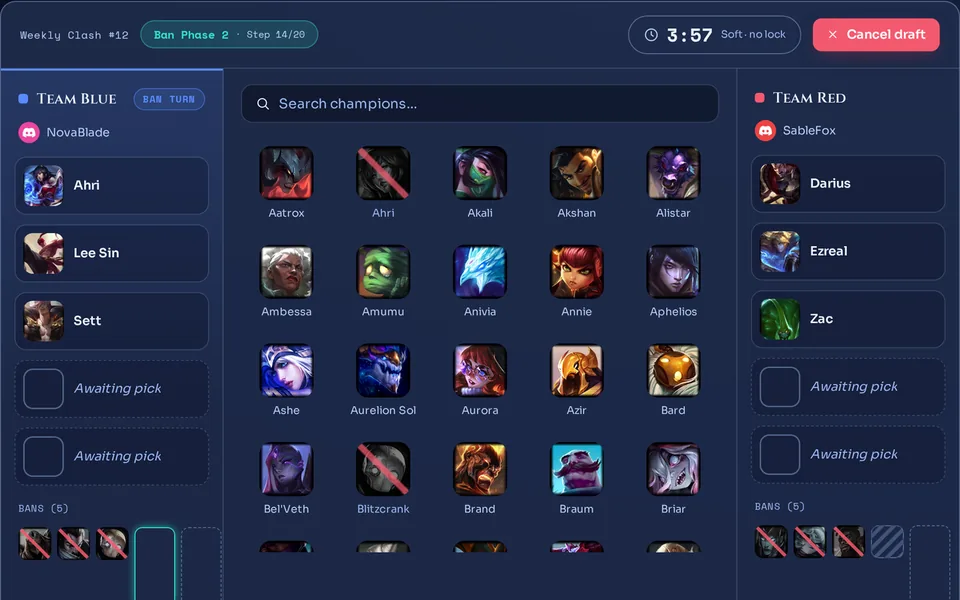 12345
12345
Press the confirm button
On a ban turn press Lock ban; on a pick turn press Lock pick. Choosing alone does not count (“Select → confirm (2-step)”). To skip a ban, press Skip ban, which shows on ban turns.
If the champion lands in your team's slot and the turn passes to the other team, it worked. The step number at the top also goes up by one.
- The captain of the team on turn confirms.
- A matchmaker or admin of the server can press for either team.
- Everyone else is read-only and sees the line Spectating — read-only · live at the bottom.
- The time left counts down from the start of each turn, with Soft · no lock beside it.
- When time runs out nothing locks and nothing moves on by itself; the number just gets a minus sign. Keeping to time is up to the captains.
- “It's not that team's turn”: you pressed on a turn that had already passed because the screen was stale. The board refreshes in a moment.
- “That champion is unavailable”: the champion was already used, or is locked from an earlier set. Choose another.
- “The draft is not active”: the draft is finished or cancelled, or the match moved to a stage that no longer takes picks.
- “Couldn't load the champion list — enter a champion ID directly (e.g. Ahri)”: the champion list could not be loaded. Type the champion ID into the input box that replaces the list, then confirm.
- Press Cancel draft at the top of the board. Only the person who started the draft, and matchmakers and admins, can. The confirmation reads “Its history is kept, but this can't be undone.”.
- After cancelling, the board keeps a This draft was cancelled mark. There is no way to resume that draft; start a new one from the beginning on the match page.
Carry on with Fearless
Fearless means a champion used in an earlier set cannot be used in the next one. It is meant for multi-set matches. This is how it works in this tool.
- Champions picked in an earlier set's draft are locked in the next set. It does not matter which team picked them; both teams are locked out.
- Banned champions do not carry over. They can be banned or picked again in the next set.
- Locks add up as sets follow each other. Champions used two sets ago stay locked too.
- Only a finished draft can be continued. A draft in progress or a cancelled one adds no locks.
- There is no Soft mode, where only a team's own champions are locked, on this board.
Finish the earlier set
After the last step is confirmed, the board shows the Draft complete badge and both teams' Final composition side by side.
Start the next set
Press Next set draft (fearless) under the finished board to start a new draft at once with the same captains and timer. You can also open the Start draft window on the match page and pick the earlier set in the Fearless chain box. That box lists only drafts finished in that match, in order, as “Set 1 draft”, “Set 2 draft”.
The Next set draft (fearless) button shows to any matchmaker or admin of the server. But only the matchmaker who created the match, or an admin, can actually start the new draft; another matchmaker who presses it is refused. Once the match moves to In progress, no new set can be opened either.
Check the locked champions
The top of the new board shows a badge like “10 earlier picks locked” (that is the number when the earlier set was the first one and went all the way; it grows as sets pile up). Locked champions look dark in the list with a ⛓ mark, and hovering shows “Fearless — used in a previous set”. They cannot be selected, and the server rejects them for the same reason.
If the new board shows the locked-champions badge and the champions picked in the earlier set look dark with a ⛓ mark, Fearless is carrying over.
- Once the match moves to In progress or ends, a draft still in progress no longer takes bans or picks.
- Cancelling the match also cancels a draft in progress. Drafts that were already finished stay as they are.
We are preparing richer Fearless settings. They are not active yet, and there is nothing for you to do today.
Where results and series are recorded
A draft keeps only the champion lineup. It does not record which team won and does not change ratings. The result is confirmed separately on the match; see Confirm a result and enter records. A “set” on the board is just a draft chained within one match.
- When you enter a game played outside the flow, choosing Hard or Soft in the Fearless row puts a ⛓ mark on champions from earlier sets. It is only a mark: saving is never blocked, and unlike the board it does not lock champions. Series entry such as Bo3 and Bo5, and how to enter a game, are in Confirm a result and enter records.
Practice without a match
You can practise ban/pick without creating a match. Practice does not count toward matches, ratings, the audit log or Kleos. Matchmakers and server admins can use it.
Open the Draft practice panel
The match list screen has a Draft practice panel. Recent practice sessions are listed there; press one to open its board.
Choose an opponent and a timer
Pick a server member in the Opponent captain (optional) box to invite them as the opposing captain. Leave it empty and you stay on the Solo — you control both teams option, running both teams yourself. The timer box is the same as for a match draft. The Fearless chain box appears only when a finished practice exists, and only finished practices can be chained.
Press Start a practice
A practice board follows the same rules as a match draft: the same turn order, Fearless and timer. Playing alone, you press for both teams as their turns come. If you chose an opponent, the DM below is sent to them (the conditions are written under it). How to turn the DM switch on is in A server admin's first 5 minutes.
If a new row appears in the practice list and the board shows the Practice · unscored badge, it has started.
- Each server can have up to 3 practice sessions in progress at once. When full you see “Active practice slots are full — finish or cancel one to start another.”.
- A practice in progress with no activity for more than 48 hours is cancelled by a periodic cleanup.
- A finished or cancelled practice is deleted after 30 days. One that another practice uses as its Fearless link is kept.
- The same person can be invited up to 3 times within 60 minutes. Beyond that you see “This member has already received several practice invites in the past hour. Invite them again later, or start solo.”.
The board is a web page that only logged-in server members can open. There is no picture card to export it as. To let others watch, give server members the board address from the address bar. Whether a person can open it follows the rules below.
- The two captains and the server's matchmakers and admins can always open it.
- Other members can watch read-only when the Public match viewing switch in the server settings is on, and it starts on. When it is off, only members on that match's roster can additionally view it.
- A practice board can be opened only by its two captains, matchmakers and admins.
- A watching member's screen also updates the moment someone chooses. They can only watch, not press anything.
What is saved
- The two captains, who started the draft, each ban and pick with who pressed it, and the times are saved.
- A draft attached to a match is not deleted automatically. The history of a cancelled draft is kept as well.
- A match draft also appears in Audit log as Draft startedDraft completedDraft cancelled entries. Practice has no audit entry.
- Nothing from a draft goes into the match result or ratings.
Where to go next
How to create a match and split teams is in Team balance, lanes and positions, and how to take a match through its stages is in Run a match, step by step. Confirming the result is in Confirm a result and enter records. The layout of the console is in A tour of the web console and logging in.
Check it worked
If both teams' slots fill up as the captains confirm, and the Draft complete · 20/20 badge shows after the last step, you ran a set all the way through. If you carried on to a next set, the new board shows a badge like “10 earlier picks locked”.