Voice mileage, tiers and badges
How time in voice becomes mileage, the 5 tiers and tier roles, and what admins can set.
本页目录
- Before you start
- How voice time becomes mileage
- 5 tiers and promotion
- See your tier and progress
- 1. Open the ranking on the server home
- 2. Check the tier card on your profile
- 1. Open your tier card
- 2. Look at the server ranking
- What you control and what is stored
- Admins only: turn on, rename and repair
- 1. Turn on in Settings
- 1. Turn on with the command
- 1. Type the names and save
- 1. Rename a tier
- 1. Manage the exclusion list
- 1. Choose accounts to leave out
- 1. Repair missing roles
- 2. Know this before you turn it off
- Where to go next
- Check it worked
Before you start
Time you are in voice with other people becomes mileage, and mileage moves you up the tiers. Members and server admins both read this guide. The admin-only parts are labelled Admins only.
- A Discord server with the Kletoi bot. Mileage does not start to build up until a server admin turns on tier badges or sets a weekly report channel. On a server with both off, nothing builds up.
- Admins only: an account with Manage Server, and the bot needs the Manage Roles permission.
How voice time becomes mileage
- Two or more people are in a voice channel that is not the server's AFK channel. Bots and accounts an admin excluded do not count as people.
- Time with both your headphones and your mic on counts in full.
- Time with only your mic off counts as 0.5×, because you are still listening.
- When you are alone. With fewer than two people in the room, nothing counts.
- When you are in the server's AFK channel.
- While your headphones are off. If you are not listening, you are not taking part.
- Bots, and accounts an admin excluded.
A mute or deafen an admin applied counts the same as one you set yourself. If one person turns their headphones off, everyone else in the room keeps counting, because that person still counts toward the number of people.
- If your mic or headphone state changes again within 60 seconds, that short stretch is not cut off. It is carried into the next state and counted with it. The exception is a change that stops the time from counting (headphones off, or being left alone in the room): that short stretch is not counted.
- Time is saved when you leave or your state changes, and every 15 minutes. If the bot restarts, time since the last save can be lost.
- The same time also builds up as Kleos activity score. Kleos can go down on its own and is independent of your tier. See Build up and review your Kleos activity score.
- The setting that moves people who keep their headphones off to the AFK channel is in AFK auto-move.
5 tiers and promotion
Your tier comes from your total mileage. Total mileage never goes down, so your tier does not either. The names below are the defaults; a server can rename them.
- 🌱 Aspirant: where everyone starts. It has no role.
- 🔥 Kletoi: from 10 hours of total mileage.
- ⭐ Veteran Kletoi: from 50 hours of total mileage.
- 💎 Elder Kletoi: from 150 hours of total mileage.
- 👑 Archon Kletoi: from 500 hours of total mileage.
- If the server has tier badges on, the bot gives you the new tier's Discord role and removes the old one. You hold one tier role at a time. There are 4 roles, starting at Kletoi; the starting tier has none.
- The roles are listed as their own group in the member list, and each tier has its own colour.
- The bot checks your tier whenever your voice state changes, such as when you join or leave or change your mic or headphone state. So if you pass a threshold in a long call, the role appears the next time your state changes.
- It is sent only when you pass the highest tier you have reached so far. Nothing is sent when a tier goes down.
- The server's Allow bot DM notifications switch must be on. It is in the New channel defaults section of the web console's Settings page, and it is off by default on new servers (Server settings at a glance).
- It does not arrive if you turned off Results & summaries in your DM settings. Change it in the DM preferences card on Home.
See your tier and progress
在哪里操作?
在网页控制台中
Open the ranking on the server home
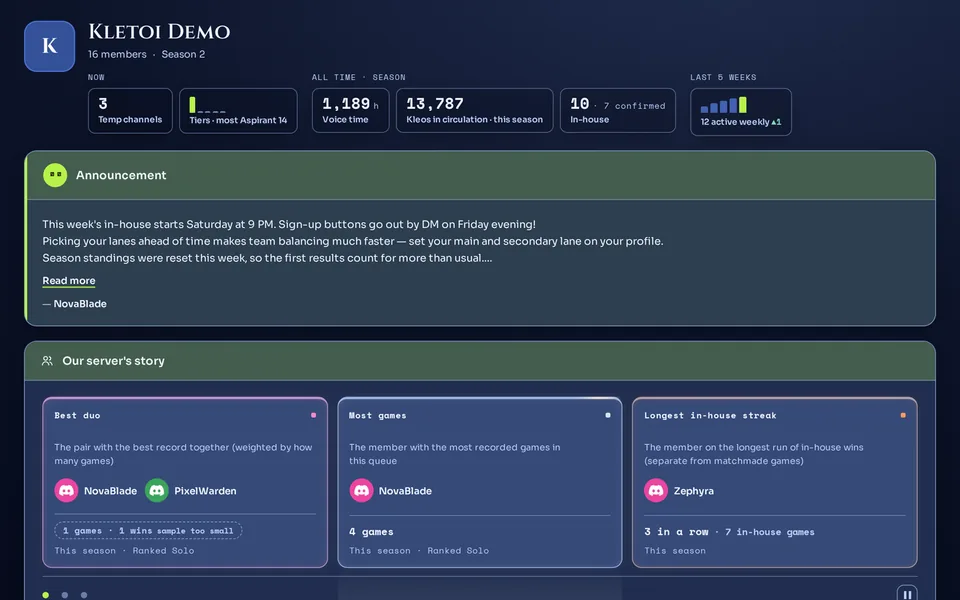
On Home, press Server home on the server's card. The server home is open to members of the same server. The ranking is further down and opens sorted By mileage first.
Check the tier card on your profile
The My current tier card at the top of your profile shows your tier and the time left to the next one. How to read it is in Your profile and match history.
在 Discord 中
Open your tier card
/badge meA card only you can see appears.The card is titled 🎖️ My Voice Badge and has TierTotal timeServer rankTo next tier fields. The Total time field is your mileage, counted by the rules above. If you are already at the top tier, the To next tier field says “Top tier reached! 🎉”.
Look at the server ranking
/badge leaderboardThe server's top 10 by voice time are posted in the channel.The 🏆 Voice Time Leaderboard card lists rank, member, tier name and total time on each line. It is posted openly in the channel, so other members can see it. If no time has been counted yet, only you see a short notice.
You are done when the /badge me card shows your TierTotal timeServer rank. On the server home ranking, the row with the You tag is yours.
What you control and what is stored
- Turn the promotion DM on or off with the Results & summaries item in the DM preferences card on Home.
- On a server where you run the
/voice-meta forget-mecommand, your voice activity records, total mileage, Kleos score and tier history are deleted, and the bot tries to remove the tier role it gave you. Only the server where you run it is affected. What else the command deletes and what stays is in Delete your data or change privacy settings. - Whether mileage builds up at all is up to the server admin, who can also leave an account out of the count (see the Admins only part below).
- There is no switch to hide your name from the voice-time rankings (the server home ranking and
/badge leaderboard)./badge leaderboardposts names, tiers and total hours to the whole channel. If the server sets a weekly report channel, the default setup also posts a weekly voice-time ranking there.
- Voice activity records: which channel, from when to when, how many seconds, and the mileage rate for that stretch. The content of conversations is not stored. These records are deleted automatically once the retention period in the privacy policy (35 days by default, longer on servers with Premium) has passed.
- Your total mileage, your tier and your Kleos score. Total mileage does not shrink or reset and is deleted only by the
/voice-meta forget-mecommand. The command's scope is in Delete your data or change privacy settings. - A history of tier changes. It exists only from the moment of each change.
Admins only: turn on, rename and repair
Only people with Manage Server do this part; members can skip it. Check the bot's permissions in The server permissions Kletoi needs. The whole settings page is in Server settings at a glance.
- Turn on tier badges (the first step below). Mileage and the tier roles start together.
- Set a weekly report channel with the
/admin set-report-channelcommand. Mileage builds up, but no tier roles are given. - Counting continues while either one is on. If you clear the report channel while badges are on, mileage still builds up, and if you turn badges off while a report channel is set, it still does.
在哪里操作?
在网页控制台中
Turn on in Settings
Open the Tier badges · Season rewards card and press Turn badges on. Roles that already exist are reused and only missing ones are created. If only some are created, you see “Some tier roles could not be created. Check that the bot has Manage Roles and that the server is not at the 250-role limit.”.
在 Discord 中
Turn on with the command
/admin enable-badgesThe bot creates the tier roles. It is refused if the bot lacks Manage Roles.Check it on the Digital badges line of the /admin show-config command. On that line, tier badges are called digital badges.
You are done when the Tier badges · Season rewards card in Settings shows On and the tier roles appear in your Discord server's role list. On a server turning badges on for the first time, members get their tier from their next voice activity.
在哪里操作?
在网页控制台中
Type the names and save
There is one Tier names field per tier, with its emoji and threshold hours in front. Type a name and press Save names. Fields you leave empty are not changed. To undo everything, press Reset names and confirm. These fields appear only after digital badges are on.
在 Discord 中
Rename a tier
/admin set-badge-namePick the tier to rename and type the new name (up to 80 characters)./admin reset-badge-namesClears every custom name and goes back to the defaults.- The emoji and thresholds are fixed; only the name changes. The tier role is renamed to “emoji + new name” too.
- The new name also shows on the
/badge mecard, in the rankings and in the promotion DM.
The names were saved but the Discord role names could not be changed. You see “The names were saved, but the Discord role names could not be updated. Check that the bot role sits above the tier roles and that it has Manage Roles.”
在哪里操作?
在网页控制台中
Manage the exclusion list
Open the Excluded accounts card, pick an account from Pick an account to exclude…, and press Exclude. To remove one, press the icon button at the end of its row (its tooltip says Remove) and confirm.
在 Discord 中
Choose accounts to leave out
/admin exclude-addPick a bot or an alt account. If it is in a voice channel right now, it is recalculated at once./admin exclude-removeLets the account count again./admin exclude-listShows which accounts are left out right now.No time builds up for a left-out account even when it is in the room, and it does not count toward the two people the room needs before anyone's time counts.
Repair missing roles
While badges are on, the Tier role status list shows a role for each tier. A deleted role is marked missing, and one you renamed in Discord is marked name differs. Press Create / repair roles to recreate the missing roles. Pressing it again right away is blocked for a moment.
If this list shows “The bot does not have Manage Roles. Turn it on for the bot role under Server Settings and Roles.” or “The bot role sits below the tier roles. Drag the bot role above them under Server Settings and Roles, otherwise renaming, granting and deleting all fail.” above it, fix the bot's role in your server settings.
A recreated role is not given back automatically to members who were already promoted; they receive it at their next promotion. Even if you leave a deleted role alone, the bot recreates the missing roles when a member is promoted to a tier whose role is missing.
Know this before you turn it off
Turn it off with the /admin disable-badges command or the Turn badges off button. The tier roles are deleted, including the ones members hold. Custom names are kept, so turning it on again restores them. Roles of members who were already promoted are not given back when you turn it on again; they receive them at their next promotion.
You see “No weekly report channel is set either. Turning badges off now stops voice activity tracking entirely.” Turning badges off then stops mileage from building up at all.
All is well when every tier in the Tier role status list shows a role name, with no missing mark and no warning.
We are preparing a way for a server to choose to start tiers over each season.
Where to go next
The activity score that builds up from the same voice time is in Build up and review your Kleos activity score, the weekly goals are in Weekly challenges, and running a season is in Running a season and its wrap-up. Continue reading your profile in Your profile and match history. To look around the web screens, see A tour of the web console and logging in. Admins setting up a server for the first time can start with A server admin's first 5 minutes, and members with A member's first 5 minutes. What the command that deletes your voice records covers is in Delete your data or change privacy settings.
Check it worked
After you have been in voice with other people, the /badge me command shows a bigger Total time value. If the server has tier badges on and you passed a threshold, the new tier role appears, and accounts listed under Excluded accounts in the server settings do not grow.