Appointing and revoking matchmakers
Appoint and revoke the members who run matches, and see what a matchmaker can and cannot do.
本页目录
- Before you start
- Appoint a matchmaker
- 1. Pick a member on the Members screen
- 2. Press Assign matchmaker
- 3. Or appoint straight from the member list
- 1. Send the /matchmaker grant command
- What a matchmaker can do
- Revoke access
- 1. Press the revoke button in Current matchmakers
- 2. Or switch it off in the member list
- 1. Send the /matchmaker revoke command
- Where it is logged
- 1. Open the Audit log screen
- 2. Filter by type
- If you get stuck
- Where to go next
- Check it worked
Before you start
A matchmaker is a member who runs matches without Manage Server. Appoint one when running matches piles up on the people who manage the server and you want to hand over only that.
- Anyone with the Manage Server permission (the server owner included): does everything a matchmaker does without being appointed. Unless you appoint them too, they do not appear in the Current matchmakers list.
- Appointed members: people an admin appoints with the steps in this page. They do not gain Manage Server.
- Everyone else: cannot open the console's match screens. They follow the matches they are invited to on the member screens.
- A Discord account with the Manage Server permission
- A bot with in-house matches turned on. When it is off, the matchmaker commands and the appoint panel do not show.
- The member to hand it to. Only people in this server can be appointed.
Appoint a matchmaker
在哪里操作?
在网页控制台中
Pick a member on the Members screen
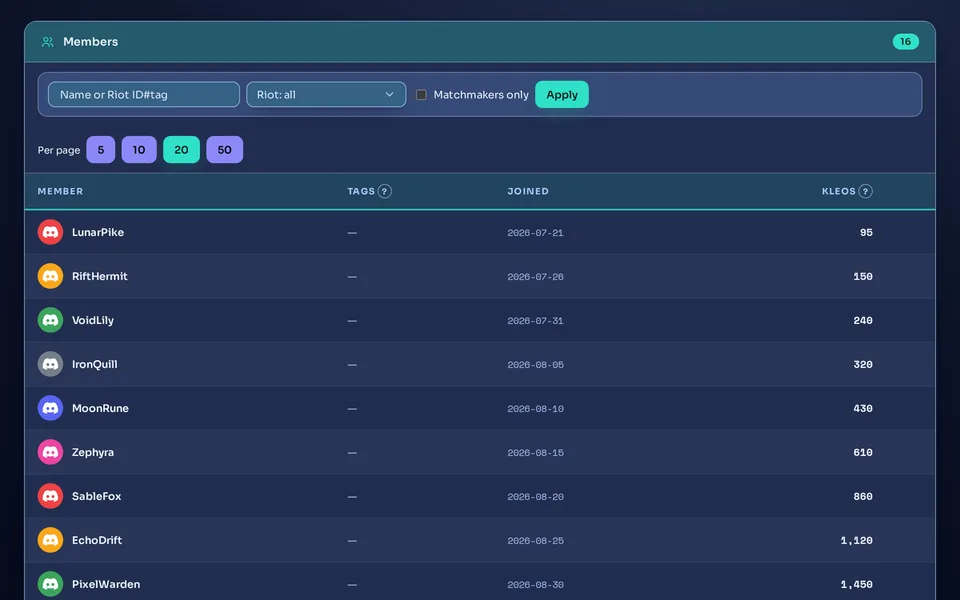
In the Assign matchmaker panel below the member list, open the Select a member… box and pick a member. You can search by name. Members who are already appointed are left out of the list.
 1
1
Press Assign matchmaker
You come back to the same screen with a “Matchmaker granted.” notice, and the member shows up in the Current matchmakers list.
Or appoint straight from the member list
Press the ⋯ button at the right end of a member's row and turn on the Matchmaker switch in the menu. It is the same appointment. A switch that is already on means the member is appointed.
在 Discord 中
Send the /matchmaker grant command
/matchmaker grantPick the memberThe reply that it worked comes back visible only to you. By default, people without Manage Server do not see this command, and using it is refused.
You are done when the member shows in the Current matchmakers list on the web. In Discord, the /matchmaker list command shows Matchmakers.
The bot does not tell the member when you appoint them. Let them know yourself. From the next time they open it, they can use the match screens. Tell them how to open the match screen too (see the “Where a matchmaker opens the match screen” box below).
What a matchmaker can do
- Create matches: build the teams and send invites on the Matches screen. (Team balance, lanes and positions)
- Take their own matches to the end: move the stages, change teams, confirm a result or cancel. (Run a match, step by step)
- Review no-shows on their own matches. (No-shows, marks and MVP)
- Register, pause and delete recurring schedules. Any matchmaker can manage any schedule, not only the ones they created. (Recurring matches and time polls)
- The Share card row on a match with a confirmed result shows to every matchmaker, even on matches others created. The Announce highlight button works on their own matches only. (Share cards and result cards · Server settings at a glance)
- Manual-entry review: approve or reject the games members entered by hand (played outside the match flow) on the Manual records screen. (Confirm a result and enter records)
- Ban/pick: start practice sessions and press a captain's turn for them in a match. (Ban/pick and Fearless · Ban/pick and Fearless)
- Squads: create, invite, remove and disband. Any matchmaker can manage any squad. (Squads (fixed teams))
- The ⚔️ button on a temporary room's panel: gives you a link to the team builder filled with the people in that room. No match is created yet.
A matchmaker can only look at matches someone else created. The stage buttons do not show, and pressing one is refused with “You can only manage matches you created.”. Only people with Manage Server can press everything on every match. The ban/pick board is the one exception: once a board is open, any matchmaker can press a captain's turn for them or cancel it (Ban/pick and Fearless). The details are in Run a match, step by step.
The short info box on the members screen describes the role broadly, as running matches (create, balance, confirm, review) without Manage Server. The exact rule is this: a matchmaker without Manage Server manages only the matches they created.
- The Admin console button on Home and the Create match button on the server home show only to people with Manage Server. A matchmaker without it does not see either.
- There are two first-time ways in. The ⚔️ button on a temporary room's panel (the room needs at least 2 people) gives a link to the team builder. Or an admin sends them the address of the web console's Matches screen (open the Matches menu in the console and copy the address from the address bar).
- After that, the bot's notification DMs carry console links too: the stage nudge DM, the poll deadline DM and the AI summary DM. When the nudge DM goes out is in Run a match, step by step. What to tell a matchmaker who sees no console button is in The console is locked or commands are missing.
- Appoint and revoke matchmakers. A matchmaker cannot appoint anyone.
- Open the console's admin screens such as Settings, Members and Audit log.
- Press buttons on matches others created, and change server settings.
Revoke access
在哪里操作?
在网页控制台中
Press the revoke button in Current matchmakers
It is the button at the right end of the member's row (hover to see Revoke). A Revoke matchmaker access window appears once; press Revoke to finish. The window says “This removes the member's matchmaker access. You can reassign it anytime.”
Or switch it off in the member list
Turn off the Matchmaker switch in the ⋯ menu of the member's row. This one revokes at once, with no confirm window.
在 Discord 中
Send the /matchmaker revoke command
/matchmaker revokePick the memberIf you pick someone who is not a matchmaker right now, the reply is “That member isn't a matchmaker.”
You are done when the member leaves the Current matchmakers list. It applies the next time they open a screen or press a button, and you can appoint them again anytime.
- The matches stay as they are. They are not cancelled or handed over, and the creator's name stays.
- The match screens no longer open for the revoked person: they see the Access denied page (403) instead. Someone with Manage Server takes the match from there.
- The sub-needed DM sent when a member withdraws after the lineup is confirmed still goes to the match creator after revocation. They can no longer open the console, so someone with Manage Server needs to arrange the sub.
- The nudge DM that goes to the creator when a match sits too long at one stage goes to the server owner once the creator can no longer manage it.
- Recurring schedules they created keep creating matches. Switch the schedule off to stop it.
Where it is logged
Open the Audit log screen
Every appointment and revoke is logged in Audit log, whether you did it on the web or with a command. The columns are Time, Actor, Action and Target. The Actor is the admin who did it and the Target is the member.
Filter by type
In the activity type dropdown, pick Grant matchmaker or Revoke matchmaker and press Apply. Appointing a member who is already appointed adds one more row.
Old audit rows are deleted automatically: 30 days by default and 180 days on servers with Premium (Compare plans and free-tier limits). Note down anything you need to keep longer.
If you get stuck
- The Select a member… box lists only people the bot has recorded as members of this server. Members who are already appointed and people who left are left out.
- If they are still missing, appoint them with the
/matchmaker grantcommand. The command lets you pick any member of this server. - If there is nobody to appoint at all, you see “No members available to assign.”.
- If you saw “Please try again in a moment”, nothing was saved. Press the button again in a moment. The reason, and what to do if it keeps happening, is in The console is locked or commands are missing.
- Check by looking for the member in the Current matchmakers list. If they are there, it was saved.
- The Admin console button on Home shows only for people with Manage Server. A matchmaker opens the screen with the ⚔️ button on a room panel, the address of the Matches screen an admin sent them, or the link in a match DM.
- Check that the member is in this server and that the Discord account they log in with is the one you appointed. Someone who is not in this server cannot open it.
- A match whose buttons do nothing may be someone else's. A matchmaker can press only the matches they created.
That member was already revoked or never appointed. People with Manage Server work as matchmakers without being appointed, so there is nothing to revoke. To take that permission away, change their role in Discord.
Appointing and revoking are saved whatever the bot's Discord permissions are. If match DMs or rooms fail, that is a bot-permission matter: check it with the /admin check-permissions command in The server permissions Kletoi needs. If you cannot see the slash command, first check that your account has Manage Server.
Where to go next
Now the new matchmaker can create matches. How they first open the match screen is in the “Where a matchmaker opens the match screen” box above. Building teams is in Team balance, lanes and positions, and the path from creating a match to a confirmed result is in Run a match, step by step. Records after the game and manual-entry review continue in Confirm a result and enter records. Server settings such as channels and the DM switch are in Server settings at a glance, and the cards behind the console's Share card row and the Announce highlight button are in Share cards and result cards. If you are new to setting the server up, see A server admin's first 5 minutes. If the web screens are new to you, see A tour of the web console and logging in.
Check it worked
You are done when the member is in the Current matchmakers list and Audit log has a Grant matchmaker row. A revoked member leaves the list and a Revoke matchmaker row appears.