Run a match, step by step
Once a match has been created, take it from recruiting to a confirmed result in five stages, and see what each button does to answers and DMs and what cannot be undone.
本页目录
- Before you start
- Who can press what
- Take a match through five stages
- 1. Recruiting — collect answers
- 2. Close recruiting with Confirm roster
- 3. Lock the teams with Lock lineup
- 4. Press Start match when the game starts
- 5. Finish with Confirm result
- What members receive at each stage
- What you cannot undo
- Where to find a match later
- 6. Open the console's match list
- 7. Members look in My matches
- Where to go next
- Check it worked
Before you start
This page starts after the match has been created. How to create one is in A server admin's first 5 minutes (the first match) and Team balance, lanes and positions (teams, lanes and schedule). The member side of replying to an invite is in Reply to a match invite.
- The bot must have in-house matches turned on. Everything in this category works only on such a bot (when it is off, the match screens do not open).
- One match you already created (two teams, invites sent)
- The Allow bot DM notifications switch in the server settings. How to turn it on is in A server admin's first 5 minutes. While it is off no match DM goes out.
- An account that may run matches (see “Who can press what” below)
Who can press what
- People with the Manage Server permission (admins): every button on every match in the server.
- Matchmakers: can open the console's match screen. The stage buttons work only on matches you created. On someone else's match you can look, but no buttons show.
- If a matchmaker tries to act on someone else's match anyway, it is refused with “You can only manage matches you created.”
- Only admins appoint matchmakers (A server admin's first 5 minutes · Appointing and revoking matchmakers).
Take a match through five stages
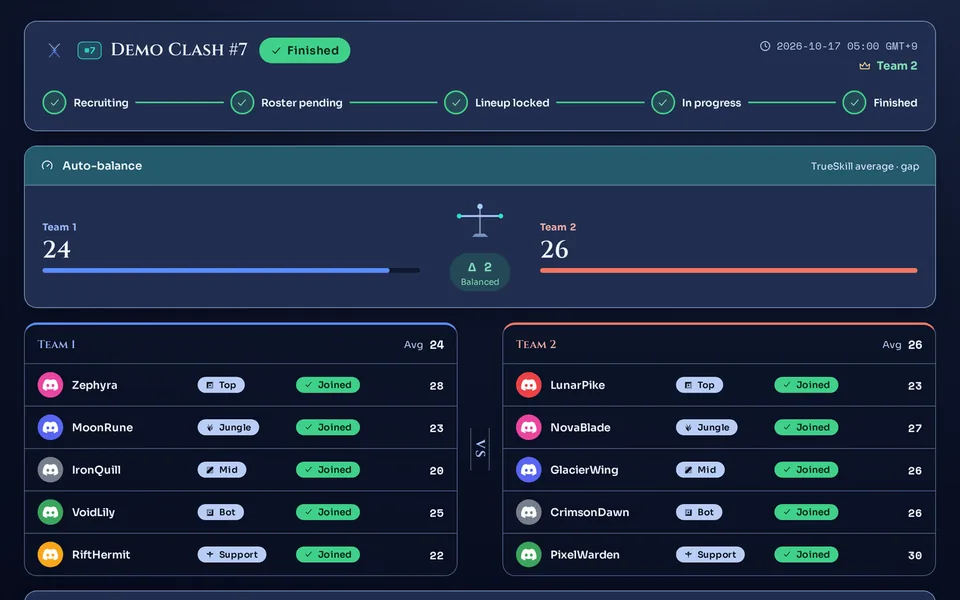
A match only moves forward: Recruiting → Roster pending → Lineup locked → In progress → Finished. At the end of the stage row at the top of the match screen, one button for the next stage shows. Press it to move one step. There is no button to go back.
Champion ban/pick is in Ban/pick and Fearless, and setting the match time is in Recurring matches and time polls.
 1
1
Recruiting — collect answers
A match is in Recruiting right after you create it. Members can switch between JoinMaybeDecline as often as they like, with no penalty (when answers can change at each stage is in Reply to a match invite). Meanwhile you can re-balance with Auto-balance, change each player's lane, swap in a sub, name the match, and use Open a time poll to pick a time. Team building and setting a time are in Team balance, lanes and positions.
- For a match with a scheduled time, members who have not answered get one reminder DM once it is within 60 minutes of the start. Reminders go out only in Recruiting.
- An invite expires 1 hour after the scheduled time, and its answer buttons stop working. A match with no scheduled time never expires.
- At creation: both teams must be the same size (1 to 5 each), every player needs a team and a lane, and no lane may repeat within a team. Lanes: Top, Jungle, Mid, Bot, Support. 4v4 or 3v3 is fine.
- When you press Lock lineup: it only checks that each team has at least one player who joined or is unsure. It does not check that the teams are the same size. If someone declined, fill the slot with a sub before locking.
- If the server turned on Require Riot link, you cannot create the match or add a sub while a member has not linked Riot. How to link is in Link and re-verify your Riot account.
Close recruiting with Confirm roster
When the answers are in, press Confirm roster. The match moves to Roster pending. This button sends no DM to members.
- New Join and Maybe answers close. Only Decline still works. A member who presses another button sees “The roster is set — only “Decline” works now.”
- Balancing, lane changes, sub swaps and renaming keep working.
- There is no button to go back. You cannot reopen recruiting, so check before you press.
You are done when the stage row shows Roster pending as the current stage and the button at its end changes to Lock lineup.
Lock the teams with Lock lineup
Once the players and lanes are settled, press Lock lineup. The match moves to Lineup locked. If a team has nobody who joined or is unsure, it is refused with “Both teams need players.”
- Everyone who answered Maybe becomes joined.
- Joined players get the Teams assembled DM. People who have not answered, or who declined, do not get it.
- If a member pulls out in this stage it is recorded as a no-show and costs up to 120 Kleos. The button closes once the match is In progress. How to pull out and what it costs is in No-shows, marks and MVP.
- When a member pulls out, the person who created the match gets a DM that a sub is needed. Fill the slot with a sub swap.
- Lane changes and Auto-balance lock. Sub swaps and renaming keep working.
If the server turned on Enable team voice, team voice channels open right after the lineup lock when there is no scheduled time or it is within 30 minutes of the start. If it is earlier, they open when you press Start match. If they did not open, press Open team voice.
You are done when the stage row shows Lineup locked and joined players receive the Teams assembled DM (no DM goes out if the server's DM switch is off).
Press Start match when the game starts
Press Start match when the game starts. The match moves to In progress. You can press it regardless of the scheduled time, and no DM goes out to members.
- Members' Withdraw button closes.
- Sub swaps and lane changes close too. Renaming and opening team voice still work.
- The Cancel button disappears. A live match cannot be cancelled; you confirm a result or end it without one.
Finish with Confirm result
When the game is over, press Confirm result. In the window, under Select the winning team, pick the winning team (or the No result option), tick the confirmation box, and press Confirm. The Confirm button stays disabled until a choice is made and the box is ticked. What confirming changes, and how to enter a game played outside the flow, is in Confirm a result and enter records.
- “Confirming applies TrueSkill MMR immediately and cannot be undone.”
- Everyone who joined gets a DM that the match record was registered (with a feedback link). If the server turned on automatic result cards and set an announce channel, a result card is also posted there.
To end without a result, pick the No result option. What it does is explained in Confirm a result and enter records.
In Lineup locked you can use Record result now to skip Start match and record the result right away.
You are done when the stage row is checked through Finished and the notice “Match confirmed. MMR applied; controls are locked.” shows.
What members receive at each stage
- When you create the match: the invite DM (Join, Maybe, Decline). Anyone the DM did not reach can answer on the invite posted in the channel set under Match announce channel, if the server set one.
- Recruiting: one reminder to people who have not answered, as the start gets close.
- Roster pending: moving the match here sends no DM.
- Lineup locked: the Teams assembled DM to joined players. If a member pulls out, the match creator gets a sub-needed DM.
- In progress: moving the match here sends no DM.
- Sub swap (Recruiting to Lineup locked): the sub who comes in gets a sub-assigned DM.
- A match stuck in one stage for a long time: a nudge DM to the person who created it (see “A forgotten match is not cancelled for you” below).
- Result confirmed: the record-registered DM to joined players (see Confirm a result and enter records).
- Cancelled: a cancel DM to people still invited, joined, or unsure.
- With Allow bot DM notifications off in the server, none of the DMs above go out (A server admin's first 5 minutes). The same goes for a member who blocked DMs. How to turn the switch on is also in I didn't get the invite DM.
- A member who turned that kind of notice off in the DM preferences section of Home on the web does not get the reminder or the record-registered DM.
What you cannot undo
- Stages only go forward. You cannot move a match from Roster pending back to Recruiting, or from Lineup locked back to Roster pending.
- Confirming a winner with Confirm applies MMR at once and cannot be undone. A confirmed match is locked.
- Ending with No result cannot be undone either.
- Cancelling with Cancel (or Cancel match in the confirmation window) cannot be undone. People still invited, joined, or unsure get a cancel DM.
- If you cancel in Lineup locked, a no-show (Kleos deduction) already recorded for a member stays. To clear it, press Undo on that member in the attendance review; the deducted Kleos is returned. See No-shows, marks and MVP.
Nothing cancels or ends a forgotten match automatically. Instead, when a match sits in one stage for a long time, the person who created it gets one nudge DM per stage (the server owner, if the creator left or lost access). For Recruiting, Roster pending and Lineup locked, it comes 48 hours after the later of entering the stage and the scheduled time (7 days after entering the stage if there is no scheduled time); for In progress, 12 hours after it started. If Allow bot DM notifications is off in the server, this nudge DM does not go out either. The match status does not change, so end it yourself.
Where to find a match later
Open the console's match list
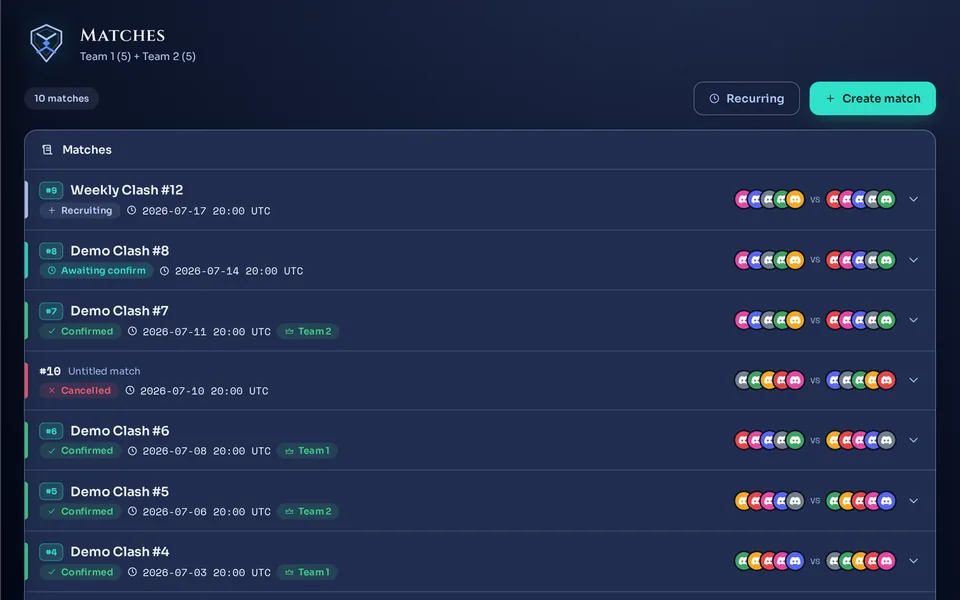
The Matches screen lists the server's matches, the latest scheduled time first; matches with no scheduled time come last. Each row has a stage badge, and a row opens the match screen. Finished matches stay here too.
This list shows only the latest 50 matches. There is no button to load older ones.
 12
12
Members look in My matches
Invited members find their own matches under My matches on the web. The Open on the web button on the invite DM opens the same match page (A member's first 5 minutes).
Where to go next
How to create a match and balance teams is in Team balance, lanes and positions. Confirming a result and entering games played outside the flow is in Confirm a result and enter records, and handling no-shows and feedback is in No-shows, marks and MVP. The article to share with members is Reply to a match invite. How to appoint matchmakers is in Appointing and revoking matchmakers. If the web screens are new to you, start with A tour of the web console and logging in.
Check it worked
If one match filled the stage row one step at a time from Recruiting to Finished, you have run your first match end to end. With the Allow bot DM notifications switch on in the server, joined players also got the Teams assembled DM and the record-registered DM along the way.